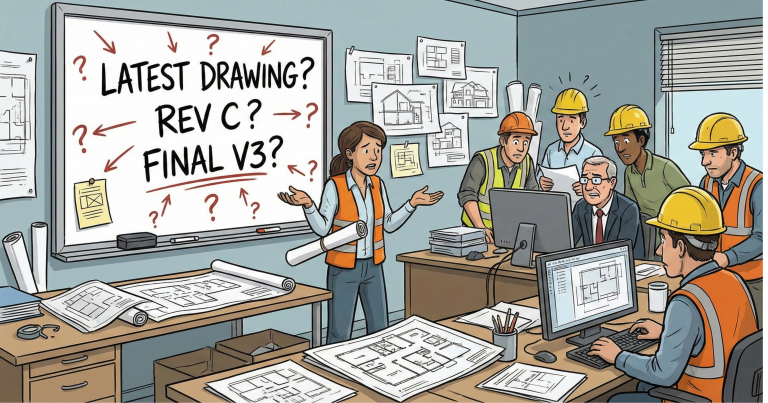
There’s a specific kind of site stress that doesn’t show up on programmes or risk registers: the moment someone asks for “the latest drawing” and half the team pauses, because nobody’s fully sure what “latest” means anymore.
It’s not laziness. It’s friction. When folders are inconsistent and filenames are vague, people spend time searching, double-checking, and re-sending files that already exist. Then small mistakes creep in: the wrong revision gets printed, an outdated RAMS circulates, a contractor builds from yesterday’s information, and suddenly “just a quick query” becomes a meeting.
A naming convention is not admin. It’s decision support. It helps your team move faster with fewer errors, and it makes collaboration calmer when deadlines are loud.
This guide is written for UK construction teams who are busy, practical, and often working across a mix of systems, such as an on-site file server via VPN for large design files and SharePoint for collaboration. The best part is that the principles still work if you change tools later.
What good naming gives you (in plain terms)
When your project has a working naming system, you get:
- Speed: fewer “where is it?” messages
- Confidence: less second-guessing and fewer wrong versions used
- Traceability: you can see what was issued and when, without detective work
- Consistency across projects: new starters don’t need a guided tour of your folders
- Less duplication: fewer copies living in random places
If you’ve ever watched a team waste 20 minutes finding a file that should have taken 20 seconds, you already know the value.
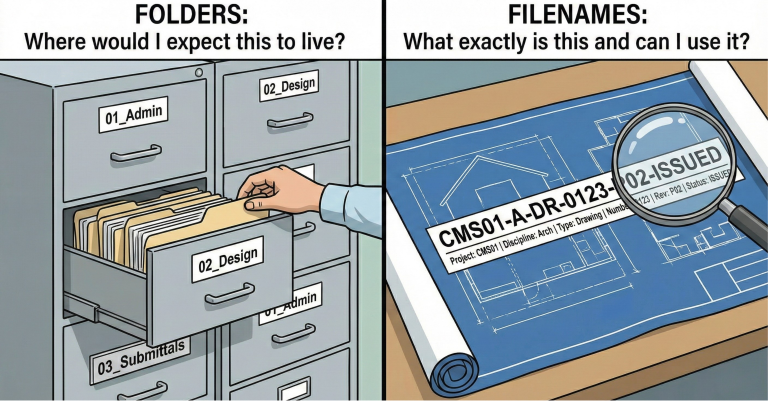
The Golden Rule: Folders help you find, Filenames help you trust
A simple folder structure that works in most tools
You don’t need 40 top-level folders. You need a few that match how construction teams actually work.
Recommended top-level folders
Use a numbered structure so it sorts consistently:
- 01_Admin & Contracts
- 02_Design
- 03_Submittals
- 04_RFIs & Queries
- 05_Site Records
- 06_Quality
- 07_Commercial
- 08_Handover
- 99_Archive
The numbers are not decoration. They stop folders jumping around alphabetically and make the “map” consistent for everyone.
The design folder that prevents most confusion
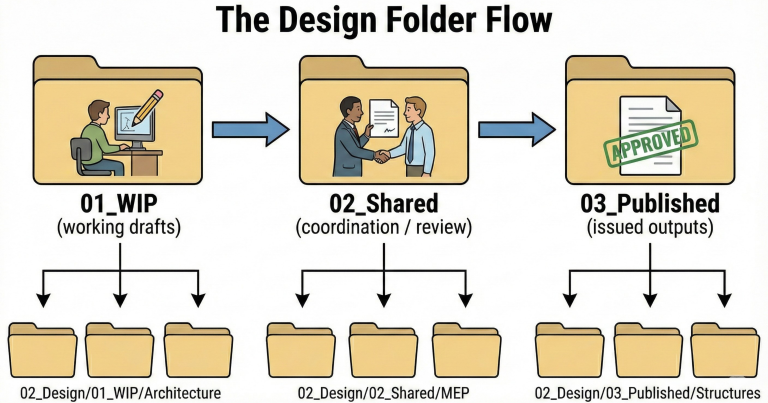
Inside 02_Design, use a three-stage flow that mirrors real life:
- 01_WIP (working drafts)
- 02_Shared (coordination / review)
- 03_Published (issued outputs)
Then split by discipline:
02_Design/01_WIP/Architecture
02_Design/02_Shared/MEP
02_Design/03_Published/Structures
This is simple enough for small projects and scalable enough for big ones.
Give people one safe “dump zone”
Create one controlled parking bay:
00_Inbox (clear weekly)
It’s a pressure valve. People can save quickly during a hectic day, and then tidy in a routine sweep.
File naming that busy teams will actually use
If you want adoption, your naming convention must be:
- Easy to learn,
- Fast to type,
- and Consistent across disciplines.
CMS Desk recommended filename pattern
Here’s a practical pattern that works well on UK projects and aligns with structured information thinking:
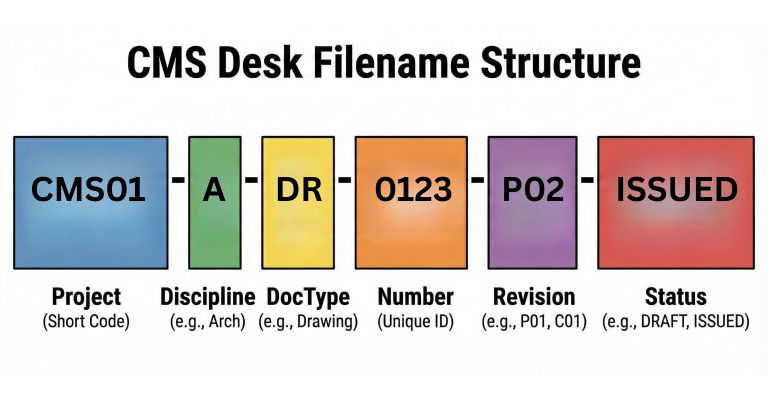
Project-Discipline-DocType-Number-Revision-Status
What each part means:
- Project: short code (e.g., CMS01)
- Discipline: A / S / M / E / Civ (agree your own list)
- DocType: DR (drawing), RFI, RAMS, MIN (minutes), REP (report), ITP, NCR, etc.
- Number: unique identifier (4 digits is common, e.g., 0123)
- Revision: P01, P02… or C01… (whatever your team agrees)
- Status: a simple label that tells people what it’s for (e.g., DRAFT, REVIEW, ISSUED, APPROVED)
Examples (real-world, readable)
Drawing issued for coordination
- CMS01-A-DR-0123-P02-ISSUED
MEP RAMS approved
- CMS01-M-RAMS-0027-01-APPROVED
RFI still open
- CMS01-M-RFI-0108-02-OPEN
Meeting minutes
- CMS01-PM-MIN-0016-01-ISSUED
These filenames tell a story at a glance: what it is, who it’s for, and whether it’s safe to use.
The five rules that stop naming chaos (and arguments)
These are the guardrails that keep things sane.
1) Ban “final”
“Final” is how you get six versions of “final.”
Use revision numbers instead.
2) Pick one separator and stick to it
Hyphens are fine. Underscores are fine. Choose one.
Consistency beats style.
3) Keep names short and avoid tricky characters
Some platforms dislike special characters and long paths. Keep it clean, keep it boring.
A simple internal rule is:
If it would look messy in an email subject line, it’s probably too messy for a filename.
4) Use dates only when time matters
Dates are useful for diaries, reports, inspections and photos.
Use: YYYY-MM-DD so it sorts properly.
Example:
- 2026-02-03_Site-Photos_Level-02
Don’t date everything. Otherwise folders become a timeline nobody can navigate.
5) One “truth” for each document
Decide where the master lives.
If your team uses VPN server + SharePoint, a practical approach is:
- Server (VPN): big working files and discipline WIP
- SharePoint: issued sets, approvals, registers, team comms, records
If the same file exists in both places, somebody will open the wrong one. It’s only a matter of time.
How to run server + SharePoint without duplication
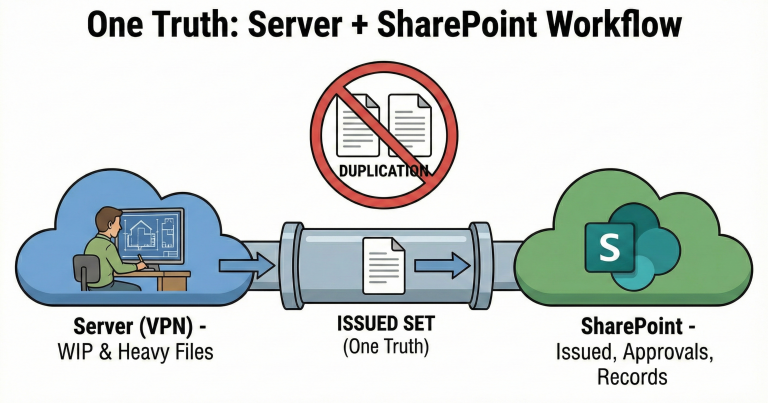
If you’re using a file server for heavy design files and SharePoint for collaboration, this workflow keeps both clean:
- Work on native files in WIP on the server
- Move “ready for review” outputs to Shared
- Move “issued” outputs to Published
- Upload the issued set (often PDFs + transmittal) to SharePoint
- Move superseded items to Archive, don’t overwrite them
This creates a clear rhythm: work, review, issue, record.
Roll it out without annoying everyone
Naming conventions fail when they arrive as a 30-page policy.
Try this instead:
- Create the folder template once and reuse it for every project
- Create a one-page “How we name files” guide with 6 examples
- Run a 10-minute walkthrough at the start of a job
- Do a weekly tidy (clear Inbox, move superseded, fix obvious outliers)
The goal is not perfection. The goal is to make it easy to do the right thing and slightly harder to do the messy thing.
Conclusion: Make information boring so delivery can be exciting
A naming convention is a small discipline that pays back daily. It reduces the “where is it?” noise, lowers the chance of using the wrong revision, and makes coordination smoother across teams and supply chain partners.
If your team is busy (and it is), the best system is the one people will actually follow. Keep the structure simple, keep filenames readable, and bake revision and status into everything that matters.
That’s how you stop chasing files and start using information like a tool, not a hazard.
FAQs
1. What’s the difference between folder structure and file naming?
Folders help people navigate and browse. Filenames help people identify and trust a document without opening it. You need both.
2. Do we need ISO 19650 to benefit from this?
No. Even if ISO 19650 isn’t a contract requirement, structured naming reduces errors and saves time. If you do have ISO requirements, this approach is a good foundation to refine into formal codes and statuses.
3. What’s the quickest improvement we can make tomorrow?
Add revision and a clear status to all key documents. Then stop using “final.”
4. What should we do with superseded documents?
Move them to a Superseded or Archive area. Don’t overwrite or delete without an agreed retention approach. Superseded files are often useful later for commercial, claims, or audit trails.
5. We have multiple contractors and consultants. How do we keep naming consistent?
Agree on the pattern during mobilisation. Provide a short “code list” for disciplines and document types. Share three examples and three “don’ts.” Consistency is a project agreement, not an individual preference.